Before Unit 3 · Lesson 1 of 3 · 20 minute session
Networks: hosts, packets and the devices that move them
A network is a set of devices, called hosts, connected so they can exchange data. Data crosses a network in small packets, each wrapped in a frame for one link. Switches join hosts inside a local area network (LAN), routers join networks, and firewalls control the traffic that crosses the boundary.
Course and exam description (CED) codes covered: 3.1.A.23.1.B.23.1.B.33.1.B.63.1.C.13.3.B.43.4.A.23.4.A.43.4.C.33.5.E.4
Last reviewed against the CED:
By the end of this session you can
- Distinguish a local area network, a wide area network and the internet.
- Identify hosts, servers and network data ports, and explain why an open data port is a risk.
- Distinguish the internal network from external networks and locate the boundary between them.
- Identify a packet's header and payload, and distinguish a packet from a frame.
- Describe the role of a switch, a router, a wireless access point and a firewall, and identify the default gateway.
What a network is
A network is a set of devices connected so that they can exchange data. Unit 3 talks about networks at three scales:
| Scale | What it covers | Who controls it |
|---|---|---|
| Local area network (LAN) | one home, classroom, office or building | one organization or household |
| Wide area network (WAN) | links between sites that are far apart, such as offices in two cities | one organization, over links leased from providers |
| The internet | millions of networks worldwide | nobody: networks agree to exchange traffic |
The company that connects an organization to the internet is its internet service provider (ISP).
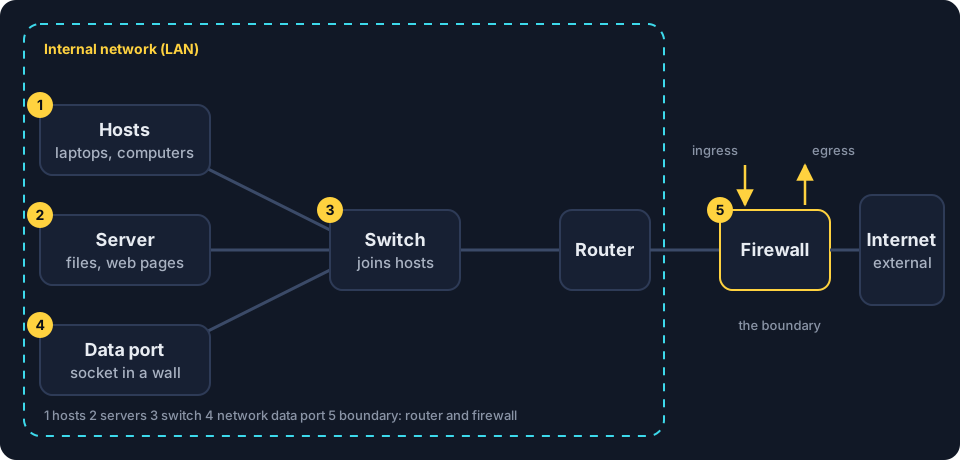
Hosts, servers and network data ports
- A host is any device that sends or receives data on a network: laptops, phones, printers and smart devices. Each host connects through a network interface card (NIC), by cable or by radio.
- A server is a host that provides a service to other hosts, such as storing files, publishing web pages or answering name lookups. A server is a device, not a kind of network.
- A network data port is a socket in a wall that is cabled to a port on a switch. Plugging a device into it connects that device to the LAN.
Think of a school: the hosts are the students and staff, the server is the library that waits for requests, and a data port is a side door into the building.
That side door is why Unit 3 cares about data ports. An adversary who plugs a laptop into an unused data port joins the LAN through the switch port, unless port security is enabled [3.1.B.3]. One compromised host on the LAN can then be used to reach other devices on it [3.1.B.2].
Two meanings of “port.” A physical port is a socket that a cable plugs into, such as a data port or a switch port. A logical port is a number that identifies a service on a host, such as port 443 for secure web pages. Unit 3 uses both, so read the context.
The internal network and its boundary
The network an organization owns and controls is its internal network. Any network outside it, such as the internet, is an external network. At the boundary, a router and a firewall control the traffic. Traffic entering the internal network is ingress; traffic leaving it is egress. Unit 3 expects a firewall at every point of ingress and egress, so an organization with two internet connections needs a firewall on each [3.4.C.3].
Data travels as packets
Data does not cross a network in one piece. A message is divided into small units called packets. Each packet travels separately, possibly by a different route, and the receiver puts the message back together in order. A lost packet can be sent again without resending everything.
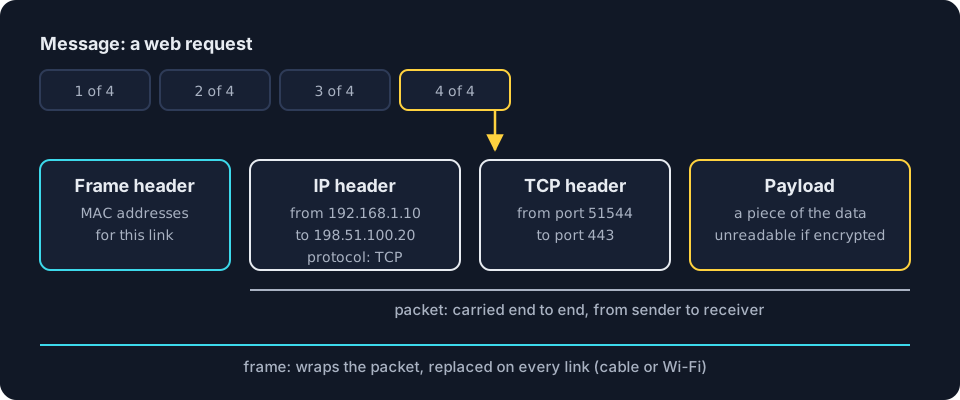
- Header. Each packet begins with a header: the addressing and control information that network devices read. The internet protocol (IP) header holds the source and destination IP addresses and the protocol. Inside it, a transmission control protocol (TCP) or user datagram protocol (UDP) header holds the source and destination ports, and TCP numbers the pieces so they can be put back in order.
- Payload. The rest of the packet is the payload, the piece of data being carried. If the connection is encrypted with HTTPS (hypertext transfer protocol secure), the payload is unreadable to anyone who captures it, but the headers stay readable.
- Frame. To cross each local link, the packet is wrapped in a frame, whose header holds the media access control (MAC) addresses of the two devices on that link. A frame on a cabled LAN is an Ethernet frame; Wi-Fi uses its own frames. Every router removes the old frame and builds a new one for the next link, while the packet inside is carried end to end.
Why firewalls care. A stateless firewall filters on header fields: IP addresses, ports and protocols [3.4.A.2]. A next-generation firewall can also read the payload, which is called deep packet inspection [3.4.A.4].
Data in transit. Data moving across a network is data in transit; data stored on a drive is data at rest. Data in transit can be captured on any link it crosses. Capturing it to read, record or copy it is eavesdropping, also called sniffing [3.1.A.2, 3.1.C.1]. A recording of the packets passing a point is a packet capture, which analysts read header by header.
The devices that move traffic
Four kinds of device carry traffic in and out of a typical LAN.
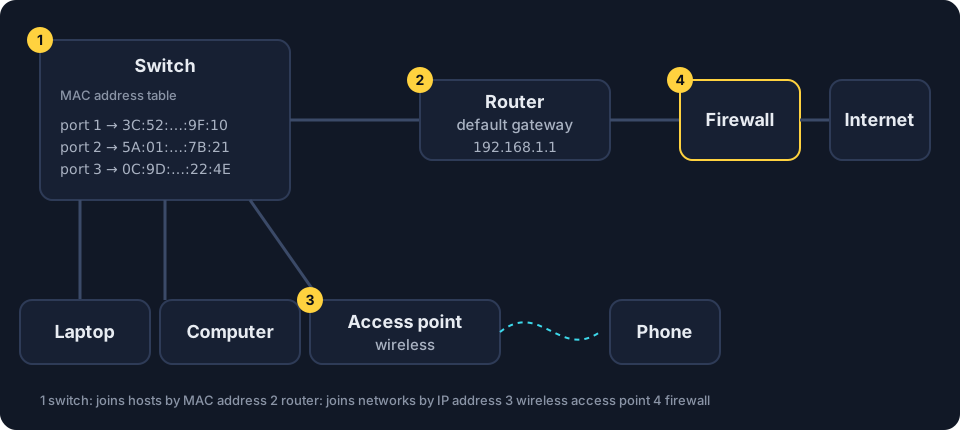
- Switch. Joins hosts within a LAN. It learns which MAC address is connected to which of its ports and stores the pairs in its MAC address table. It then sends each frame only to the port where the destination MAC address was seen.
- Router. Joins networks and forwards packets between them by reading IP addresses. The router’s address on a LAN is the default gateway: every host sends traffic for other networks to it.
- Wireless access point (WAP). Connects wireless devices to the wired LAN by radio. The Wireless basics lesson explains how it announces the network.
- Firewall. Allows or denies traffic according to a list of rules. It can run on its own device or inside another device, such as a router.
A home router is usually all four in one box. In an organization they are separate devices, which is why Unit 3 discusses the security of each one.
When a switch broadcasts: a preview of MAC flooding
A switch normally sends each frame to one port (broadcast frames, such as an ARP request, go to every port). In MAC flooding, an adversary sends the switch a flood of frames, each with a different fake MAC address, until the MAC address table is full. The switch can then fall into broadcast mode and send frames out of every port, so the adversary receives copies of other hosts’ traffic [3.1.A.2].
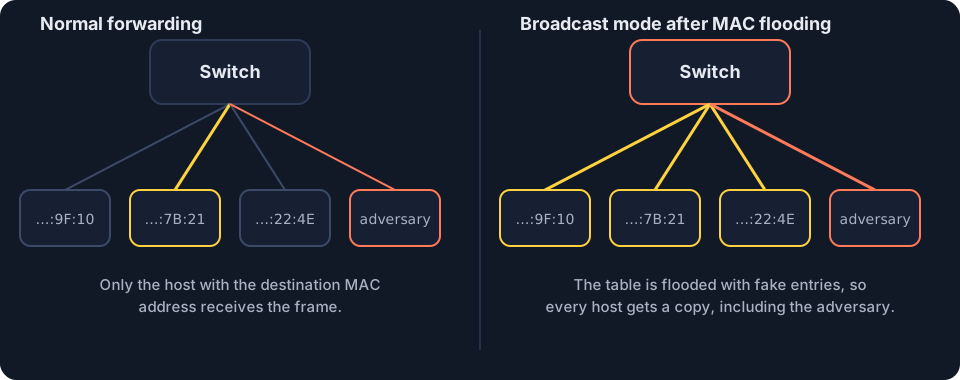
- Detect it: monitor network traffic for an unexpected surge of Ethernet frames with different MAC addresses, and check the switch’s MAC address table [3.5.E.4].
- Prevent it: port security limits the number of MAC addresses that can be used on one switch port [3.3.B.4].
Where this shows up in Unit 3
| CED | Example in Unit 3 | What you need to do |
|---|---|---|
| 3.1.B.3 | an adversary plugs a laptop into an unused data port | explain that the data port leads to a switch port and into the LAN |
| 3.1.B.6 | an adversary plugs a wireless access point into an open data port | identify a rogue access point, which bypasses the firewalls |
| 3.4.C.3 | an organization with two internet connections | place a firewall at every point of ingress and egress |
| 3.4.A.2 | a stateless firewall | name the header fields it filters on |
| 3.1.A.2 | a switch receives many frames with different MAC addresses | explain MAC flooding and broadcast mode |
| 3.3.B.4 | a switch with port security enabled | explain why limiting addresses per port prevents MAC flooding |
Lock it in: memory hooks
One picture per idea. If you remember the hook, you can rebuild the details.
- Switch vs routerSwitch = Same network, sorted by MAC. Router = Reaching other networks, sorted by IP. S stays, R roams.
- Packet vs frameThe packet is the letter; the frame is the envelope for one leg of the trip. Every router throws away the old envelope and writes a new one.
- Headers vs payloadLike a postcard in a clear sleeve: with HTTPS you can still read the address (headers), but the message (payload) is in code.
- Default gatewayThe default gateway is the school gate: anything leaving the network goes through it first.
Common misconceptions
"Only devices inside the building can reach the LAN."
Not quite. An open network data port, or a wireless signal that reaches outside, can let an adversary in.
"Encryption hides everything about a packet."
Not quite. HTTPS encryption hides the payload. The IP addresses, ports and protocol in the headers stay readable to anyone who captures the packets.
"A packet and a frame are the same thing."
Not quite. The frame wraps the packet for one link and is replaced on the next link. The packet travels end to end.
"A router and a switch do the same job."
Not quite. A switch joins hosts within one LAN using MAC addresses. A router joins networks using IP addresses.
In 30 seconds
- A LAN is one site's network; the boundary to the internet is guarded by a router and a firewall.
- Data travels as packets (headers plus payload), each wrapped in a frame that is replaced on every link.
- A switch joins hosts inside the LAN by MAC address; a router joins networks by IP address; its LAN address is the default gateway.
- MAC flooding fills a switch's table so it broadcasts frames; port security stops it.
Cover this list, say the points out loud, then take the checkpoint without scrolling back up.
Checkpoint · 6 questions
Checkpoint: Networks
Pick an answer to mark it. Every answer is explained. Your score stays in this browser only.
Key terms: flip the cards
Read the term, say the definition out loud, then flip to check. Struggling a little to remember is what makes it stick.
-
Hosttap to flip
A device that sends or receives data on a network, such as a laptop, phone, printer or server.
Example and CED codes -
Local area network (LAN)tap to flip
A network that covers one building or site and is controlled by one organization or household.
Example and CED codes -
Network data porttap to flip
A socket in a wall that is cabled to a switch port; plugging a device into it connects that device to the local area network (LAN).
Example and CED codes -
Packettap to flip
A small unit of data sent across a network, made of headers (addresses and control information) and a payload (the data).
Example and CED codes -
Frametap to flip
A unit that wraps a packet for one link, with the media access control (MAC) addresses of the two devices on that link.
Example and CED codes -
Data in transittap to flip
Data moving across a network, as opposed to data at rest, which is stored on a drive.
Example and CED codes -
Eavesdroppingtap to flip
Capturing data in transit in order to read, record or copy it.
Example and CED codes -
Switchtap to flip
A device that joins hosts within a local area network (LAN) and forwards each frame only to the port where the destination media access control (MAC) address was seen.
Example and CED codes -
MAC floodingtap to flip
Sending a switch many frames with different fake media access control (MAC) addresses so its table fills and it broadcasts frames out of every port.
Example and CED codes -
Routertap to flip
A device that joins networks and forwards packets between them by reading internet protocol (IP) addresses.
Example and CED codes -
Default gatewaytap to flip
The address of the router on a host's own network, to which the host sends every packet addressed to another network.
Example and CED codes -
Wireless access point (WAP)tap to flip
A device that connects wireless devices to a wired local area network (LAN) by radio and announces the network in beacon frames.
Example and CED codes -
Firewalltap to flip
Software that allows or denies network traffic in or out of a network using a set of rules called an access control list (ACL); it runs on its own device or inside another one, such as a router.
Example and CED codes
Questions students ask
What networking do I need to know before AP® Cybersecurity Unit 3?
You need hosts and LANs, packets and frames, the jobs of switches, routers, access points and firewalls, MAC and IP addresses, ARP, DNS, ICMP and the basics of wireless networks. This lesson covers the first half; the Addresses and Wireless basics lessons cover the rest.
What is the difference between a switch and a router?
A switch joins hosts within one LAN and delivers frames by MAC address. A router joins different networks and forwards packets by IP address. A home router box usually contains both, plus a wireless access point and a firewall.
What is the default gateway?
The default gateway is the address of the router on a host's own network. Every packet addressed to another network is sent there first. In Unit 3, ARP poisoning targets the ARP table on the default gateway.
Can an adversary read encrypted traffic on a network?
It depends on what is encrypted. With HTTPS, an adversary who captures the packets can still read the headers, so it sees the source and destination IP addresses, ports and protocol. It cannot read the encrypted payload, such as a password. Strong Wi-Fi encryption goes further and makes the whole wireless frame unreadable to outsiders; topic 3.2 covers it.